





Temu: Shop Like a Billionaire review
 Analysis by GetAllApps
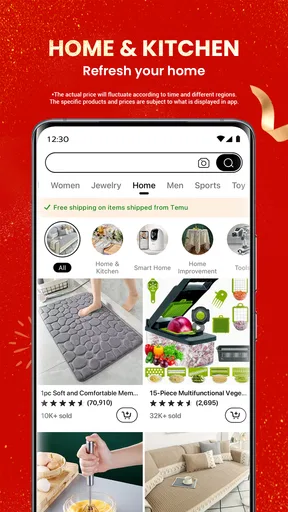
I think the most useful way to judge Temu is to imagine it on a phone used by more than one person. Someone spots a kitchen organizer they want to compare, another is browsing for craft supplies, and a third is simply curious about inexpensive everyday goods. The app makes that kind of casual discovery easy, but shared shopping also calls for a little discipline: browsing is not the same as agreeing to buy, and a busy feed can make it surprisingly easy to lose track of what each person intended to order.
Temu is a free shopping app from developer Temu, and its appeal is straightforward: browse a wide mix of products and look for low-cost finds without starting from a narrowly defined shopping list. It has an average rating of 4.4 from around 13 million ratings, and has passed 1 billion installs. Those figures suggest broad reach, but they do not tell me whether a particular item will suit your needs. For that, I would judge the listing itself carefully and treat browsing as the beginning of a decision, not the decision.
Browsing together without mixing up decisions
In a realistic household scenario, I might open the app to find replacement drawer organizers while another person uses the same device later to browse phone accessories. The convenience is obvious: there is no need to switch between several specialist shops just to explore unrelated categories. The downside is that a shared screen can blur whose preferences, saved items, or shopping plans are involved. I would agree on a simple boundary before handing the phone over: browsing together is fine, but nobody places an order for someone else without checking first.
That small habit matters because Temu is built for discovery as much as deliberate searching. When I shop with a specific need, I try to decide on the purpose and a few must-have qualities before scrolling. For an organizer, that might mean checking the intended location, shape, and material in the product information rather than choosing the first appealing image. This keeps an attractive low-cost listing from distracting me from the thing I actually need.
For shared use, I would also avoid treating a cart as a household message board. A cart can collect possibilities, but it should not be assumed to represent a final, agreed household order. If two people are comparing similar products, I find it clearer to discuss the exact item and its listing before checkout. That avoids the common mix-up where one person believes an item is merely being considered while another thinks the group has settled on it.
Set expectations before anyone shops
Temu is available at no purchase cost, but shopping in it still involves real spending once someone chooses to buy. I would make that distinction clear to a child or another occasional user of a shared device. If an adult manages purchases, the practical boundary is simple: the adult handles checkout, while other household members can point out products or help compare options. I would not assume the app itself provides household approval steps or family controls.
Account boundaries deserve the same care. If several people use one device, I would be deliberate about who is signed in and who is allowed to make purchasing decisions. A shared phone does not automatically make every account detail or order history suitable for everyone who picks it up. Keeping the person responsible for buying involved is a more dependable approach than relying on informal assumptions about who last used the app.
Before an order, I recommend slowing down long enough to check the specific listing, the selected option, and the details that matter for the intended use. A product photo can be persuasive while leaving practical questions unanswered for a rushed shopper. For household goods in particular, I would compare the item description with the space or task it needs to fit. For anything where precise compatibility or dependable performance is essential, I would be cautious and consider a retailer with clearer specialist guidance.
Coordinate a household order deliberately
One useful workflow is to shop from a short list rather than letting every person scroll independently and hope the choices come together. I would write down the household need, let each person suggest an option, then review the exact listings together. That helps separate “I like this” from “we need this,” and makes it easier to notice when two people have found near-duplicates. It is especially handy for low-stakes items such as simple storage accessories or small craft supplies, where a quick comparison may be enough to narrow the choice.
Another trade-off is that convenience can encourage adding extras. When an app presents a steady stream of possible finds, the total purpose of the trip can drift from replacing one useful item to collecting several things that were never planned. My practical rule is to pause before checkout and ask whether each item solves the original problem. If it does not, I leave it for another day. That makes the app more useful as a shopping tool and less likely to turn browsing momentum into an unplanned pile of purchases.
For a household that orders together, I would nominate one person to review the final selections. That person can check quantities and options, confirm that everyone meant to include their item, and make sure there is no duplicate caused by separate browsing. This is not a special feature claim; it is simply a sensible workflow for a shared device. Temu can make discovering possible purchases easy, but coordination still comes from the people using it.
Age, trust, and choosing what to buy
The app carries a Teen content rating, which is useful context but not a substitute for adult judgement about shopping. A rating does not mean every product is appropriate for every teenager, nor does it decide who should be permitted to spend money. I would let age-appropriate browsing depend on the young person, the item being considered, and the household’s own rules. For a younger or inexperienced shopper, I would keep an adult involved in evaluating products and making purchases.
Trust, for me, is less about assuming that every listing is either excellent or poor and more about matching confidence to the stakes. If I am looking at a nonessential household accessory, I can tolerate more uncertainty than I would for something safety-critical, a precise replacement part, or a product whose failure would cause a serious inconvenience. In those cases, I would turn to a specialist seller or a retailer with the kind of product support I need. The lower the consequence of a disappointing purchase, the more reasonable it is to explore an unfamiliar option.
I also try not to let a polished image stand in for the information needed to make a sound choice. I read the available product details, consider whether the item meets the actual use case, and avoid buying solely because it looks like a bargain. This is particularly important when someone else in the household will use the product: the person choosing should be able to explain why it fits that person’s needs, not just why the listing caught their eye.
How it compares with other ways to shop
Compared with a conventional online retailer that is organized around a familiar brand or a specific product search, Temu feels more suited to browsing across many kinds of everyday goods. That can be an advantage when I want to discover alternatives or compare small household finds in one session. A focused retailer is often the better choice when I already know the exact model, need specialist advice, or want confidence in a particular brand’s support. The best option depends on whether I value discovery or certainty more for that purchase.
Compared with visiting a physical shop, the app makes it easier to browse at home and consider unrelated categories without travelling between stores. But a screen cannot replace seeing an item in person when feel, finish, scale, or fit is central to the decision. I would use the app for products where the listing gives enough detail to judge suitability and shop locally when inspecting the item beforehand matters more than convenience.
The app’s current version is 4.92.0, and it supports Android 6.0 or later. It was released on August 25, 2022. Those details make it easier to judge whether an older Android device is likely to meet the stated minimum, though a compatible system version alone does not guarantee that every device will feel equally smooth. On iOS, I would check the app store listing for the requirements shown for the device I plan to use.
Who I would recommend it to
I would recommend Temu to someone who likes exploring a broad assortment, is comfortable judging individual listings, and wants a convenient place to look for inexpensive everyday items. It can also suit a household that enjoys comparing possibilities together, provided one person stays responsible for the final purchase. The strongest use case is casual, low-stakes shopping where discovery is part of the fun and a shopper is willing to pause and assess whether a listing truly fits.
I would skip it for a purchase where I need specialist help, exact product certainty, or a trusted in-person inspection. I would also avoid browsing when I am trying to stick to a strict shopping plan but know that endless discovery tends to derail me. In that situation, a focused search at a familiar retailer is less tempting and may be the more sensible route.
My household verdict
My recommendation is to use Temu as a place to explore, not as a reason to buy on impulse. Its broad shopping experience can be handy for finding everyday possibilities, and the scale of its audience is reflected in its substantial rating and install totals. Still, popularity does not settle whether an individual item is right for your home. Product-by-product judgement, clear account boundaries, and a deliberate checkout routine matter more than the app’s reach.
For a shared phone, I would keep the rules uncomplicated: agree who may place orders, discuss items before treating them as a group purchase, and review the final selection together. With those habits, the app can be a useful addition to household shopping. Without them, its easy browsing can create crossed wires or purchases nobody actually planned. I see it as a good fit for curious, careful shoppers—and a poor fit for anyone who needs certainty, specialist support, or strict separation between browsing and buying.
Pros and cons
Pros
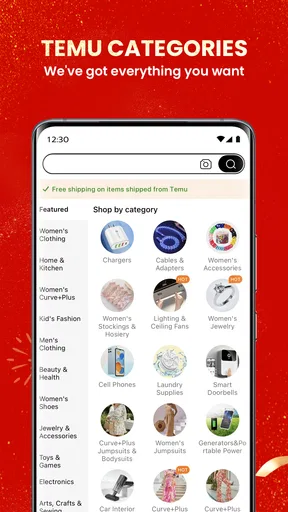
- Browsing categories makes it easy to discover a wide range of products.
- Product pages include buyer reviews and photos for extra context.
- Price filters help narrow down options within a chosen budget.
- Saved items make it convenient to revisit products later.
- Order tracking keeps delivery updates accessible in the app.
Cons
- Product quality can vary between sellers and individual items.
- Delivery times may be longer than those of local retailers.
- Some listings provide limited details about materials or sizing.
- Frequent promotions can make prices difficult to compare at a glance.
- Returns may require extra steps depending on the item and order.


